Simple Guide to Fixing “We Suspended Your Account” on Instagram
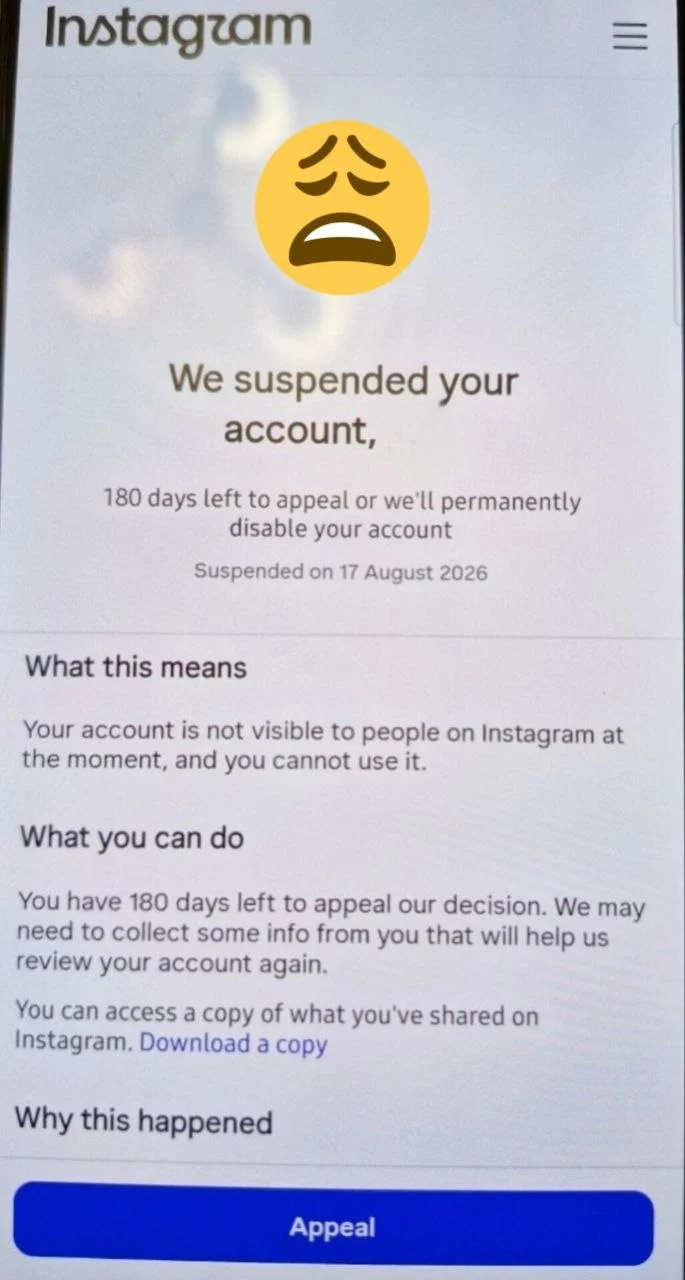
If you encountered the “We suspended your account” notification upon opening Instagram, there is no need to panic. This is a common security procedure indicating that Instagram has temporarily halted your profile’s activity.
As stated on the screen, you have 180 days to appeal the decision. Taking prompt action ensures your profile is reviewed and restored before any permanent action is taken. This article provides a clear, step-by-step resolution process.
Why Does Instagram Suspend Accounts?
Understanding why suspensions occur helps prevent future disruptions to your account. Common triggers include:
- Rapid IP Changes: Frequently switching VPN locations causes Instagram’s automated system to flag suspicious login attempts.
- Automated Activity: Mass following, unfollowing, or sending repetitive direct messages within a short timeframe.
- Policy Violations: Copyright infringement or user reports regarding posted content.
Step-by-Step Instructions to Restore Your Account
To submit an appeal and initiate the account verification process, perform the following steps directly on the notification screen:
- Tap the Appeal Button: Locate and press the blue Appeal button at the bottom of the screen.
- Complete Verification: Check the security reCAPTCHA box to confirm you are human, then tap Next.
- Confirm Contact Info: Enter the phone number or email address linked to your account to receive a security code. Input the code into the verification field.
- Record Video Selfie (If Requested): Instagram may prompt you to record a brief video selfie turning your head to verify your identity.
Once submitted, your appeal will be placed under review. The review process typically takes between 24 to 48 hours.
Strategic Growth & Security Advice for Businesses:
Unplanned account suspensions highlight the vulnerability of relying exclusively on social media platforms for customer engagement. Establishing an independent digital asset, such as a custom Website or a dedicated Mobile Application engineered by Stinoment, ensures uninterrupted business operations and safeguards your sales channels regardless of third-party platform policies.
Post-Recovery Security Checklist
After successfully regaining access to your account, follow these preventive guidelines:
• Pause high-frequency interactions (likes, comments, follows) for a few days.
• Enable Two-Factor Authentication (2FA) in your account security settings.
• Avoid using third-party automation software or unverified VPN networks.
Leave a Reply